
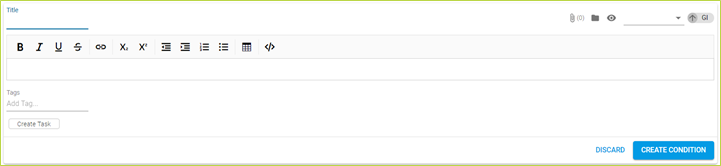
Conditions are the requirements you must meet to comply with your document. Usually they are copied directly from the applicable document i.e. the clauses in your permit or consent.
Title - The identifying number or title of the condition
Condition text - Outlining the condition copied from the original document (permit or consent etc.) verbatim, including formatting. Variations to the condition are formatted underline for new text and strike-through for deleted text. [CS-VUE uses square brackets to indicate anything added, for clarity’s sake, to original text of the condition, and [sic] to indicate that the condition was transcribed as it was found in the original permit, complete with errors]
Phasing - You may assign a phase if the document already has a phase profile. An un-phased condition always contributes to its documents’ compliance, regardless of any active or inactive phases. The phase chip on a condition is faded out if the assigned phase is not active, so you can see what conditions are active or not.
Tags - The condition has the listed tags, which may include weather and any other desirable search information (see section on Using Tags for more detail)
Comments
0 comments
Please sign in to leave a comment.