
Documents (permits, farm plans, management plans etc.) form the basis of your organisations data. These are usually based upon the legal documents your organisation has been issued.
Click + in the Home or Document page to create new documents. You can enter any document requiring tracking into CS-VUE, including resource consents, trade waste consents, plans, designations etc.
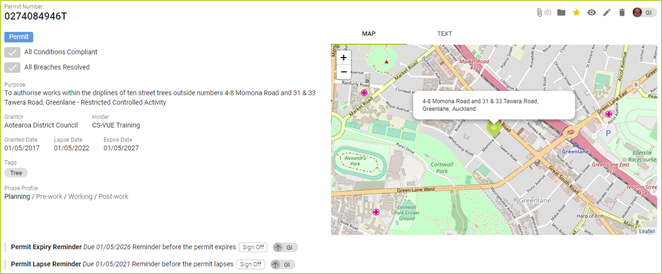
Documents have the same functionality: for simplicity we use the permit document as a training example in this example below.
*Permit Number: Required. Key reference for the permit in CS-VUE: the official permit number issued by the grantor.
*Permit Status: Required. Active means the permit contributes to compliance.
Draft means the permit does not contribute to compliance.
Archived means the permit does not contribute to compliance, because it is no longer active.
Purpose: Paraphrased or copied from the official permit.
Grantor: The consent authority that issued the permit.
Holder: The organisation that obtained the permit.
*Granted Date, Lapse Date, Expiry Date: Supplied by the Grantor and are addressed in terms of the Resource Management Act 1991 (RMA). Lapse Date is the date the permit lapses. The standard statutory time frame of five years following the Granted Date shall apply unless otherwise stated, as per Section 125 of the RMA. If the Expiry Date is blank, there is no Expiry Date.
Plain Text Location (Text View): Site address listed in the permit
Latitude (Text View), Longitude (Text View): In decimal degrees
Legal Description of Land (Text View): Usually detailed in the permit, if not, this is blank
Tags: The permit possess the listed tags, which may include activity type, territorial authority, additional file references and any other desirable search information.
Comments
0 comments
Please sign in to leave a comment.