
Phase profiles control how a permit’s conditions become active over time without knowing specific dates.
You may create an unlimited number of phase profiles so you can use different profiles for different parts of your business if you so wish.
Click on Phase Profiles in the main menu. Click on the  button in the bottom right-hand corner of the screen, select Create Phase Profile.
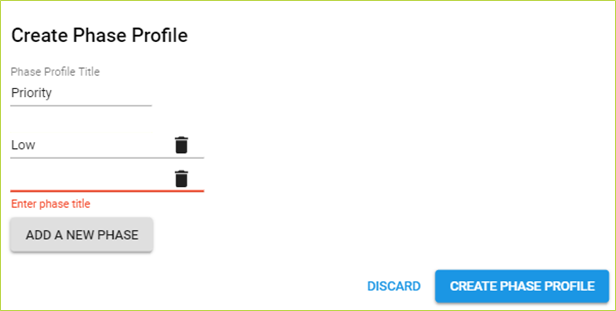
1. Enter a phase profile Title
2. Add phase titles in sequential order by clicking "Add New Phase". Phase titles are listed in the order they are added.
3. Edit phase titles by editing the text. Delete phases by clicking on the Rubbish Bin icon.
4. Click the  button to save, then close if no further editing required.
Any changes in a phase profile is reflected in all documents using that phase profile. A deleted phase or phase profile makes all affected conditions un-phased.
Comments
0 comments
Please sign in to leave a comment.